-
JDBC 게시글 개수 구하기JDBC 2022. 2. 4. 22:00
**유튜브 뉴렉쳐님의 강의를 들으면서 공부하고 정리한 내용입니다.
우리가 만든 콘솔창에서는 몇개의 페이지 중에 몇번쨰 페이지인제 게시글의 개수도 알 수 없었다.
이것을 알려면 전체 테이블에 몇개의 데이터가 있는지 알아야 할 것이다.
이 개수를 알고 나면 몇번째가 마지막페이지인지 알 수 있을 것이다.
NoticeService단에서 우리가 서비스 하는 모든것을 컨트롤 하고 있기 때문에 여기서 해결을 해 줘야한다.
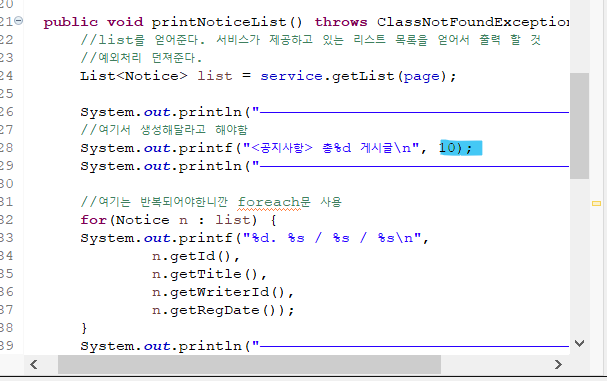
우리는 여기에 개시 글 수를 직접 입력 해 두었는데 이것을 바꿔줘야한다.
여기서 사용 할 값을 구현 할 때 전체의 값이 몇개인지 하는 것은 콘솔 전역에서 멤버로 관리해야하기때문에
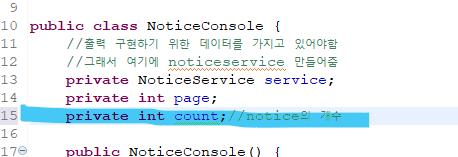
count라는 변수를 하나 선언 해준다 이것은 notice의 개수를 의미한다.
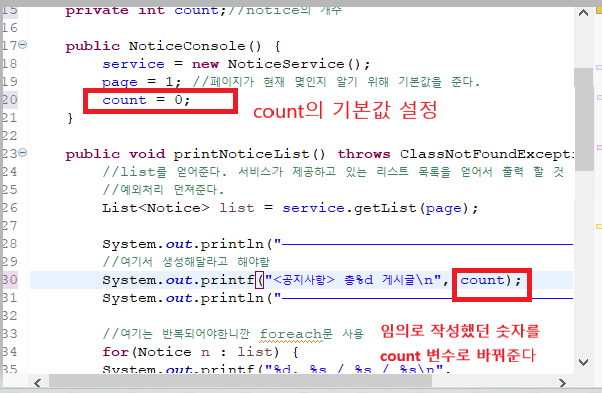
count의 기본값을 선언하고 임의로 작성 했던 숫자를 count 변수로 바꾸어 준다.

count값은 list를 통해서 현재 레코드의 상태를 얻어와야하는데 get방식으로 얻어오고
getCount라는 메서드가 없기때문에 마우스를 클릭해서 생성 해 준다.
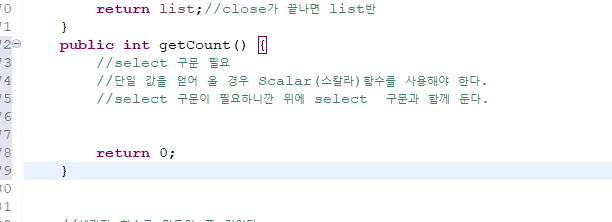
만들어진 getCount는 단일 select 구문을 이용해야하고 단일 값을 얻어와야하는데
단일 값을 얻어 올 때에는 Scalar(스칼라) 함수를 사용해야한다.
select 구문을 이용해야하기 때문에 맨 위에 select구문쪽으로 이동 시켜 준다.
package com.jae.app.service;

import java.sql.Connection;
import java.sql.DriverManager;
import java.sql.PreparedStatement;
import java.sql.ResultSet;
import java.sql.SQLException;
import java.sql.Statement;
import java.util.ArrayList;
import java.util.Date;
import java.util.List;

import com.jae.app.entity.Notice;

public class NoticeService {

	private String url = "jdbc:oracle:thin:@localhost:1521/xepdb1";
	private String uid = "sys as sysdba";
	private String pwd = "Ew170916!!";
	private String driver = "oracle.jdbc.driver.OracleDriver";

	//목록반환이 list를 통해서 어떤 걸 반환 할 것인지 getList를 통해서 반환하겠디
	//notice이름으로 반환하겠따 하고 써주는 것 import 해주기
 	public List<Notice> getList(int page) throws ClassNotFoundException, SQLException{

 		int start = 1 + (page-1)*10; //1,11,21,31,... 시작값구하기
 		int end = 10*page; // 10,20,30,40....끝값구하기

 		String sql = "SELECT * FROM NOTICE_VIEW WHERE NUMM BETWEEN ? AND ?"; //?로 값 들어올곳 작성

		Class.forName(driver);
		Connection con = DriverManager.getConnection(url,uid,pwd);
		PreparedStatement st = con.prepareStatement(sql);//여기서 sql먼저 넣어주니 밑에 sql은 빼준다
		st.setInt(1, start); //시작
		st.setInt(2, end); //끝
		ResultSet rs = st.executeQuery();

		//반환하기 위한 준비
		List<Notice> list = new ArrayList<Notice>();

		while(rs.next()) { //다음으로 넘어가기

				int id = rs.getInt("ID");
				String title = rs.getString("TITLE");//title이라는 컬럼명을 조회
				String writerId = rs.getString("WRITER_ID");
				Date regDate = rs.getDate("REGDATE");
				String content = rs.getString("CONTENT");
				int hit = rs.getInt("HIT");
				String files = rs.getString("FILES");


		//1.담은 값을 notice라는 객체를 만들면서 초기화 하는 녀석을 만들어준다.
		//객체를 만들었다. 이것을 반환하기 위해서는 (위로 올라가서 List에)
		Notice notice = new Notice(
				id,
				title,
				writerId,
				regDate,
				content,
				hit,
				files
				);

		list.add(notice); //반환 될 떄마다 리스트에 추가 되는 것
		}
		rs.close();
		st.close();
		con.close();

		return list;//close가 끝나면 list반
	}
	public int getCount() throws ClassNotFoundException, SQLException {
		//return값을 count로 주기위해 count 선언
		int count = 0; //기본값 0
		//select 구문 필요
		//단일 값을 얻어 올 경우 Scalar(스칼라)함수를 사용해야 한다.
		//select 구문이 필요하니깐 위에 select  구문과 함께 둔다.
		String sql = "SELECT COUNT(ID) COUNT FROM NOTICE "; //?로 값 들어올곳 작성

		Class.forName(driver);
		Connection con = DriverManager.getConnection(url,uid,pwd);
		Statement st = con.createStatement();//여기선 프리페어드 필요 X
		//st.setInt(1, start); //시작
		//st.setInt(2, end); //끝 인자 넘기지 않을거라 주석
		ResultSet rs = st.executeQuery(sql); //넘기는게 없어서 sql넣어줌

		//반환하기 위한 준비
		List<Notice> list = new ArrayList<Notice>();

		if(rs.next())
		count = rs.getInt("COUNT");

		rs.close();
		st.close();
		con.close();

		return count;
	}


	//세가지 함수를 만들어 줄 것이다.

	//반환 타입은 int. 데이터는 notice의 값을 넘겨 받아서 구현
	public int insert(Notice notice) throws SQLException, ClassNotFoundException {
		String title = notice.getTitle();
		String writerId= notice.getWriterId();
		String content = notice.getContent();
		String files = notice.getFiles();

		String sql = "INSERT INTO notice ("
				+ "    title,"
				+ "    writer_id,"
				+ "    content,"
				+ "    files"
				+ ") VALUES (?,?,?,?)";

		Class.forName(driver);
		Connection con = DriverManager.getConnection(url,uid,pwd);
		//Statement st = con. createStatement();
		//ResultSet rs = st.executeQuery(sql); insert/update/delete에는 사용 하지 않는다.
		PreparedStatement st = con.prepareStatement(sql);
		st.setString(1, title);
		st.setString(2, writerId);
		st.setString(3, content);
		st.setString(4, files);

		int result = st.executeUpdate();


		st.close();
		con.close();

		return result; //위에 보면 원래 반환 값으로 result를 가지고 있었기 때문에 여기서도
						//result로 반환
	}
	public int update(Notice notice) throws ClassNotFoundException, SQLException {

		String title = notice.getTitle();
		String content = notice.getContent();
		String files = notice.getFiles();
		int id = notice.getId();

		String sql = "UPDATE NOTICE "
				+ "SET "
				+ "    TITLE =?,"
				+ "    CONTENT = ?,"
				+ "    FILES = ?"
				+ "WHERE ID = ?";

		Class.forName(driver);
		Connection con = DriverManager.getConnection(url,uid,pwd);
		//Statement st = con. createStatement();
		//ResultSet rs = st.executeQuery(sql); insert/update/delete에는 사용 하지 않는다.
		PreparedStatement st = con.prepareStatement(sql);
		st.setString(1, title);
		st.setString(2, content);
		st.setString(3, files);
		st.setInt(4, id);

		int result = st.executeUpdate();

		st.close();
		con.close();

		return result; //기본 반환값 설정
	}
	//삭제 할 때는 notice전체말고 id만 넣어주어도 된다.
	public int delete(int id) throws ClassNotFoundException, SQLException { //여기서 인자로 받고 있으니깐

		//int id = 3; 여기 주석 처리 해준다.
		String sql = "DELETE NOTICE WHERE ID = ?";

		Class.forName(driver);
		Connection con = DriverManager.getConnection(url,uid,pwd);
		//Statement st = con. createStatement();
		//ResultSet rs = st.executeQuery(sql); insert/update/delete에는 사용 하지 않는다.
		PreparedStatement st = con.prepareStatement(sql);
		st.setInt(1, id);

		int result = st.executeUpdate();

		st.close();
		con.close();

		return result; //기본 반환값 설정
	}


}
COUNT는 오라클에서 별칭으로 COUNT로 바꿔줘야지만 자바에서 COUNT라는 변수명으로 사용이 가능하다.
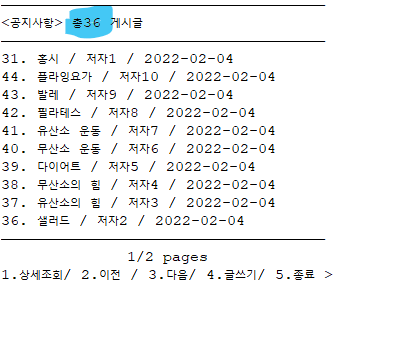
총 36개의 게시물이라는것이 뜬다
'JDBC' 카테고리의 다른 글
JDBC 검색 메뉴 구현하기 (0) 2022.02.04 JDBC 마지막 페이지 구하기 (0) 2022.02.04 JDBC로 이전/다음 페이지 구현 (0) 2022.02.04 JDBC 목록 View 생성 (0) 2022.02.04 JDBC 페이징 쿼리 (0) 2022.02.03